

Once a month, we collect what shipped in Lighthouse, so you don't have to read every release note. This issue covers the releases since our October edition (14 October), up to v26.11.8.1.
Then & Now: did it change anything?
You started coaching a team three months ago. They limited their WIP and began slicing smaller. Now someone asks: did it change anything? The Metrics tab shows recent days only, so the "before" has long dropped out of view, and the screenshots you took back then never quite compare to today's.
Every team and portfolio now has a Reports tab, and its first report is Then & Now. You pick a window for Then, for example, the 90 days before you came in. Lighthouse freezes the flow metrics for that window, and rebuilds them from history if Then is already in the past. Now always ends today. Each time you open the report, Cycle Time, Throughput, WIP and Work Item Age sit side by side, Then against Now, with the change on every line. A summary at the top says what improved and what got worse.
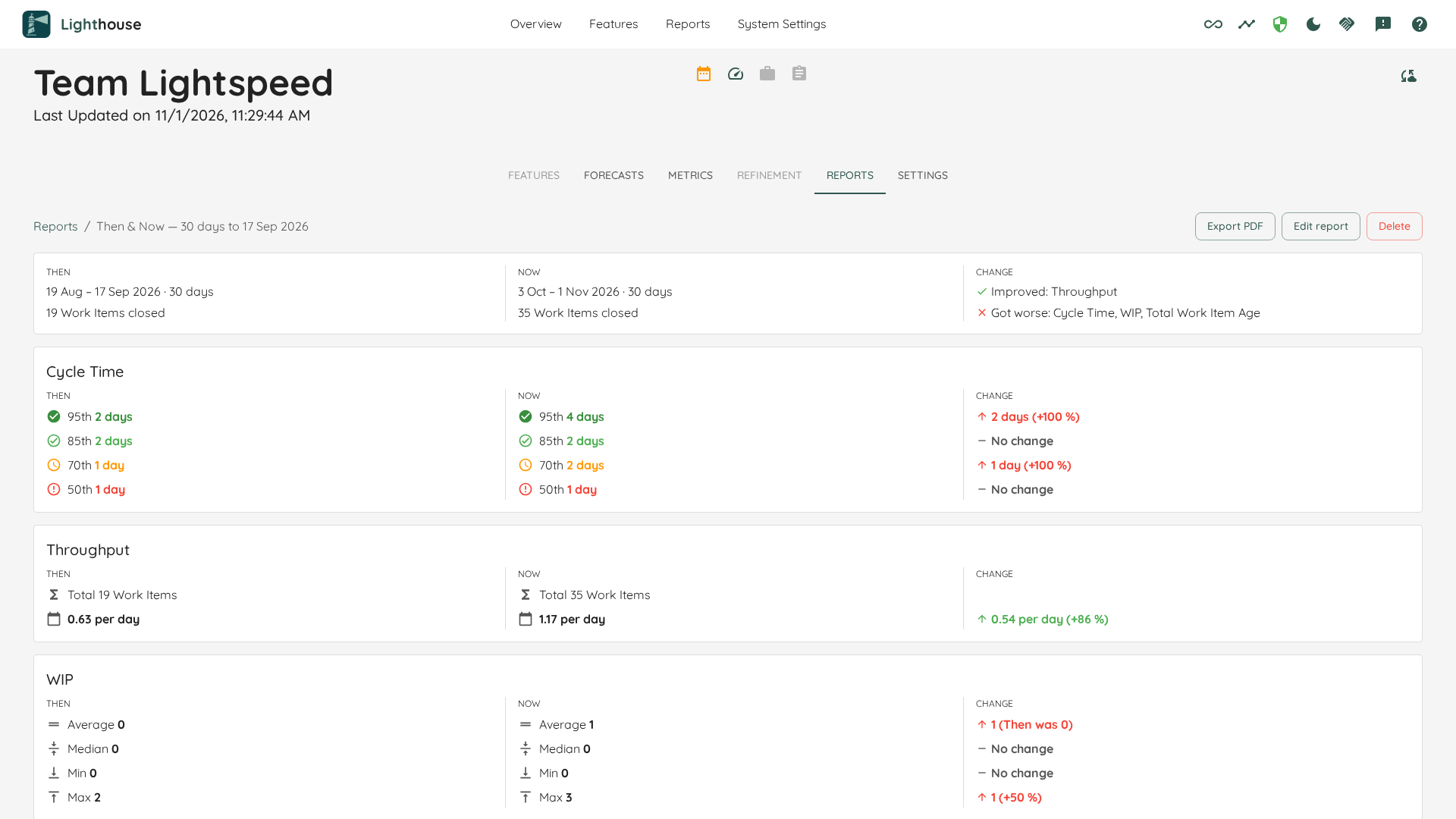
Try it: v26.10.16.6 or later, open a team's Reports tab. Community includes one Then & Now report per team and portfolio; Premium has no limit. How it works: Reports.
Get the report to people who never open Lighthouse
A report often has to reach a sponsor, a steering meeting, or a slide deck. Until now, that meant screenshots, cropped, pasted, and out of date by the next meeting.
Every report now has Export PDF. Lighthouse reads the report fresh and gives you a dated PDF with a header and footer on every page. Export PDF is part of Community.
If you look after many teams, there is now a Reports page in the top navigation. It lists every report you can read, across all teams and portfolios, with its owner. Select several to remove them or to export them as one PDF. With Premium, Create reports asks for the settings once and creates the same report on every team and portfolio you pick.
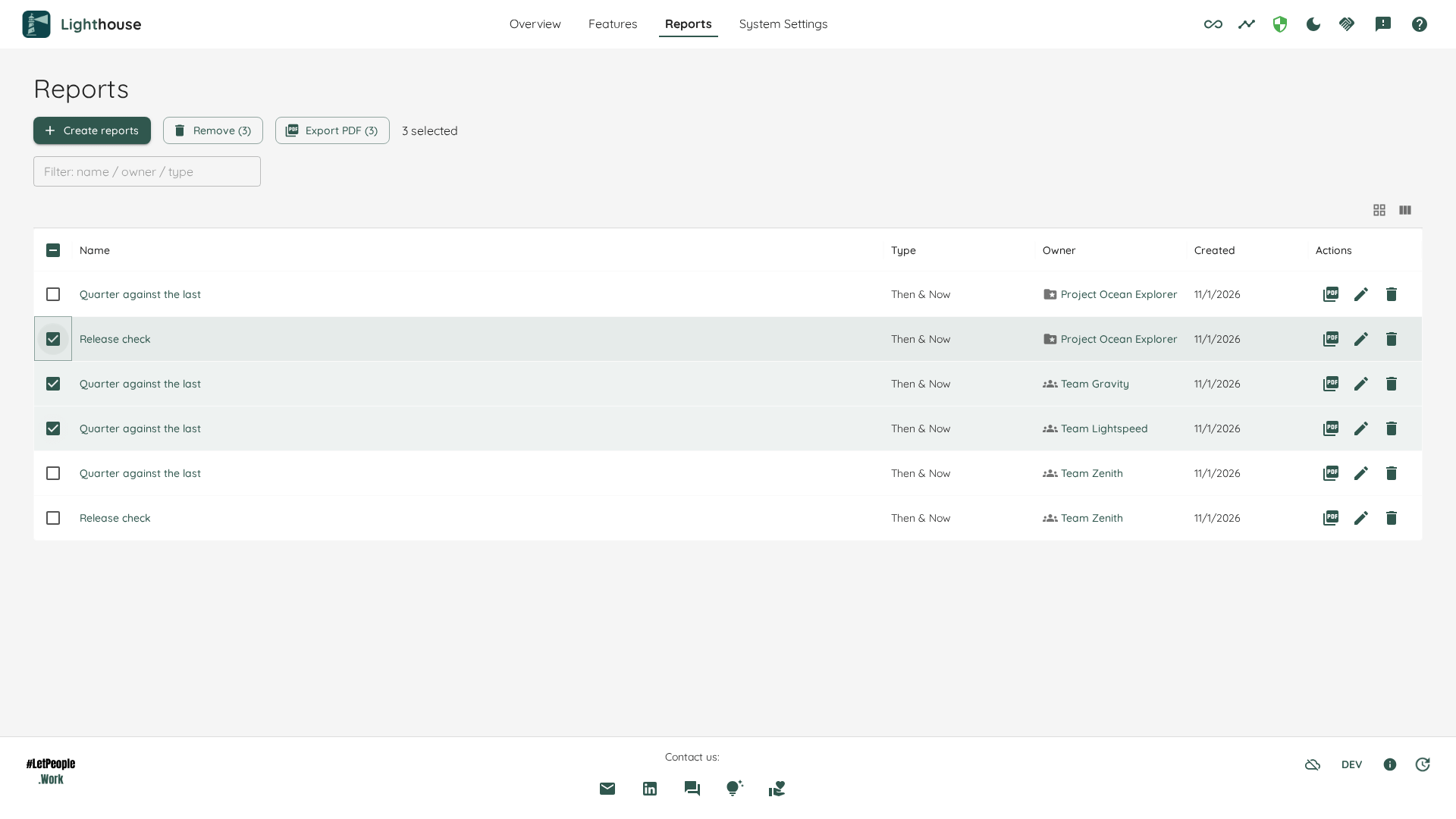
Try it: Export PDF from v26.10.25.1, the Reports page from v26.11.1.2. How it works: Export PDF and The Reports Page.
Also new
Set things up once per connection, not once per team. The Parent Override Field, Estimation, and, for portfolios, the Dependency, Size Estimate, and Feature Owner fields now have a default on the connection. A new team follows it, and a team can still keep its own choice. Connection defaults, v26.10.19.10 (docs)
Lighthouse stays fast with big portfolios and long forecasts. Forecasts run on their own, so pages keep answering while they work, and Stop in the Task Manager really stops. Portfolios with hundreds of features load much faster. v26.10.19.10 and v26.11.1.2 (docs)
Find the parent wherever your tracker keeps it. Some features hang under the built-in parent, others under a link or a custom field. Give Lighthouse up to five places to look, in order, and the first one that names a parent wins. Parent sources, v26.11.8.1 (docs)
See dependencies however you record them. Name any Jira link type or Azure DevOps relation type, and Lighthouse reads the waits from it. Dependencies, v26.10.19.10 (Jira, Azure DevOps)
Know how much of a feature your team usually takes on. The Feature Size chart and percentiles are now on every team too, counting only the team's own share. Feature Size on the Team, v26.10.16.6
If you use Jira, read this before you update to v26.11.1.2. Lighthouse now always works with Jira's original status and work item type names, whatever language the user behind the token has set. After the update, every Jira team and portfolio takes one full refresh. A team that was set up with translated names (for example, In Arbeit instead of In Progress) needs the Board Wizard run again. Details: Status and Work Item Type Names.
What's next: levels and connections
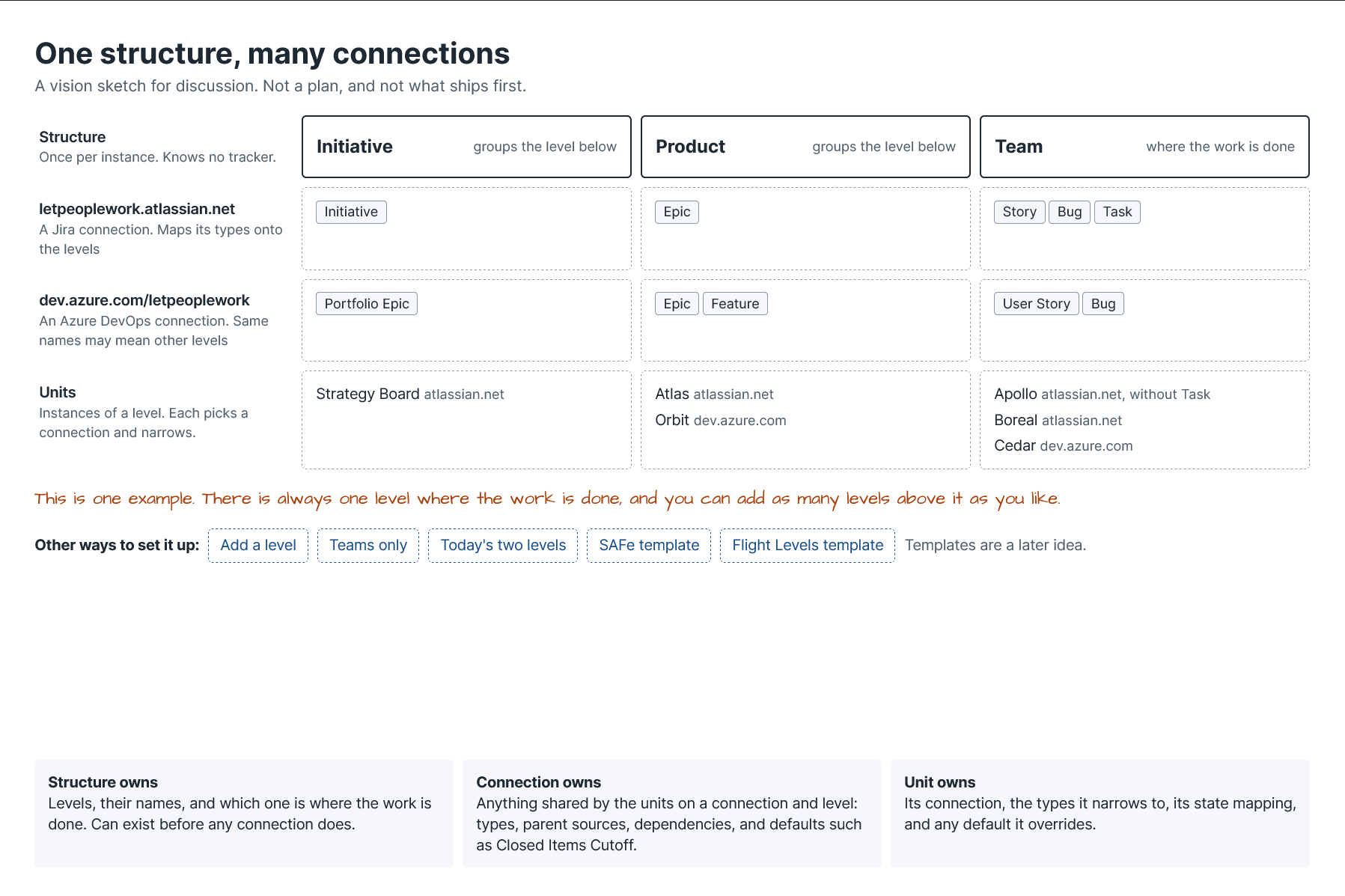
We are rethinking how you set up Lighthouse. Today you configure each team and portfolio on its own. The idea: you describe once how your organization is structured, for example, Initiative, Product, Team. Then each connection says which of its work item types belong on which level. A new team becomes a name, a query, and a few unticks. You can enter an item key and see how Lighthouse connects it through the levels, and where a link is missing.
These are rough sketches, not a plan with dates. We shared them in our community Slack and would like more voices before we build. Does this structure fit how your organization works? What wouldn't fit? Join the thread in #general on Slack or simply reply to this email.
What else happened?
Lighthouse Live: Beyond Burnups with Nick Brown (4 November). Nick showed why burnup and burndown charts forecast badly when work varies and scope shifts, and what probabilistic forecasting does better, from feature-level WIP to dependencies across teams. Watch the recording or get Nick's slides.
On the blog: The chains were never locked (31 October). Peter wrote up a case study from his own coaching: a team of five in a fintech company that opened a new sprint every two weeks, with around 60 items in progress, because nobody had ever told them they could stop. One session later they dropped sprints and started to pull work. Two months on, their Then & Now report shows 85% of items done within 9 days, down from 139, and Peter is honest about what the data does not show yet.
Your topic at Lighthouse Live?
There is no session on the calendar right now, and we'd like your input on the next ones. Is there a topic you want to hear about, or one you'd like to talk about yourself? Write to us at lighthouselive@letpeople.work.
Tell us what you think
Hit reply and tell us what you'd like to see next, or what you're still missing in Lighthouse. We read every answer.
Benjamin and Peter
Stay in touch
Slack: questions, ideas and help from other Lighthouse users in our community Slack.
Meetup: join Lighthouse Live so you never miss a session.
LinkedIn: follow LetPeopleWork for the small news in between.
Lighthouse Premium: running more than three teams or a portfolio, or want forecasts written back to Jira or Azure DevOps? See what Premium adds.